Building BoltCreator: From an Idea to a SaaS For Creators
apr 12, 2026
|8 min read
Every product has a story.
Some begin with a business plan.
Some begin with market research.
BoltCreator began with a simple frustration.
Creating eye-catching thumbnails was taking longer than building the actual projects.
After facing the same problem again and again, I decided to build the solution I wished already existed.

Chapter 1 — The Problem That Started Everything
As someone who enjoys building products, launching them is almost as important as building them.
But every launch had one repeating bottleneck.
The thumbnail.
I wasn't looking for generic AI-generated images. I needed thumbnails that looked:
- premium
- clean
- modern
- launch-ready
Most tools could generate images, but very few could take an existing image and transform it into a polished, eye-catching thumbnail — the kind you'd actually want to post on Product Hunt, Peerlist, LinkedIn, or X.
Instead of opening design tools every single time I shipped something, I started wondering:
Why not build a tool that does this automatically?
That single question became BoltCreator.
Chapter 2 — Turning the Idea into a Real Product
At the beginning, BoltCreator was incredibly small.
The goal wasn't to build dozens of features.
The goal was simple.
Let users upload an image, describe what they want, and generate a thumbnail that's actually ready to post.
The core workflow shaped itself around three steps:
- Upload — drag and drop any image
- Describe — write a short prompt to guide the AI
- Generate — pick the count, choose an aspect ratio, and hit Generate
As development continued, the project slowly evolved from an experiment into a complete SaaS application.
New ideas kept coming after every version. Features like Remix Mode, multiple aspect ratio presets (1:1, 4:3, 3:2, 16:9, 9:16), and batch generation were all added because they solved real problems I kept running into.
Instead of asking "What else can I add?", I kept asking "What would actually help creators ship faster?"
That mindset shaped every feature.
Chapter 3 — Choosing the Right Tech Stack
Building the product wasn't just about writing code.
It was also about learning technologies I had never used before.
The final stack includes technologies that each solve a specific problem.
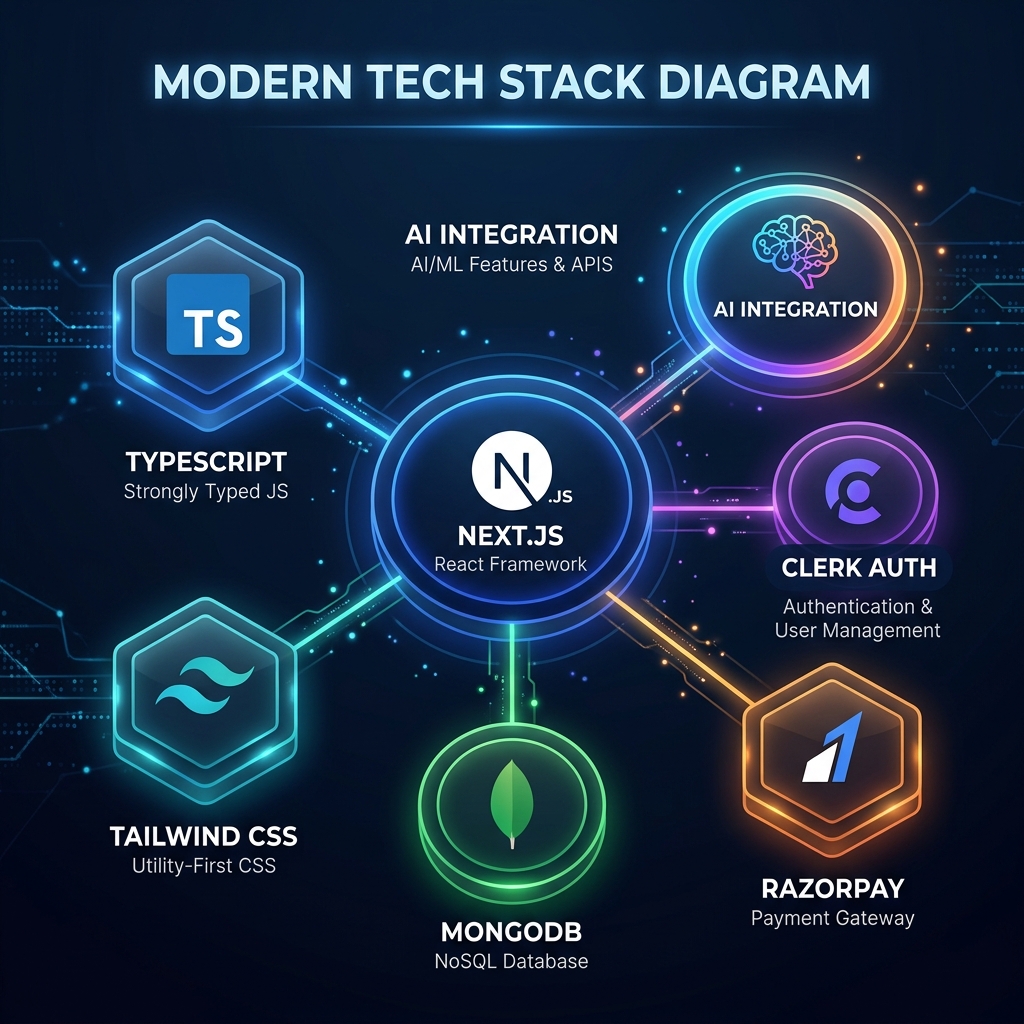
Frontend
- Next.js
- TypeScript
- Tailwind CSS
- Framer Motion
- Shadcn UI
These provide a fast, responsive interface with reusable components and a polished user experience.
Backend
- Next.js Server Actions
- API Routes
Keeping everything inside one framework simplified deployment and maintenance significantly.
Database
- MongoDB
A flexible, scalable NoSQL database for storing users, generated thumbnails, credits, and application data.
Authentication
- Clerk Auth
Instead of spending weeks building authentication from scratch, Clerk provided a secure, production-ready auth system with minimal setup — including social logins and session management.
Payments
- Razorpay
Razorpay handled the entire billing and credit-purchase flow, making it easy to accept payments and manage subscription-style credits for both Indian and global users.
AI
The thumbnail generation pipeline combines carefully designed prompts with modern image generation models. Users upload an image, describe the result they want, and the AI transforms it into polished, launch-ready thumbnails — not generic artwork.
Every generated thumbnail passes through prompt engineering that focuses on layout, composition, typography placement, and visual hierarchy.
Chapter 4 — Project Architecture & File Structure
As BoltCreator grew, maintaining a clean folder structure became essential.
A good architecture makes adding new features much easier.
boltcreator/

│
├── app/
│   ├── (marketing)/
│   ├── dashboard/
│   ├── api/
│   ├── pricing/
│   ├── blog/
│   └── layout.tsx
│

├── components/
│   ├── ui/
│   ├── dashboard/
│   ├── landing/
│   ├── thumbnail/
│   └── shared/
│

├── lib/
│   ├── auth/
│   ├── mongodb/
│   ├── ai/
│   ├── utils/
│   └── validations/
│

├── actions/
│

├── hooks/
│

├── types/
│

├── constants/
│

├── public/
│

├── models/
│

├── styles/
│

└── middleware.ts
Why this structure?
Each folder has a single responsibility.
app/
Contains routes, pages, layouts, and server actions.
components/
Reusable UI components separated by feature — landing page, thumbnail generator, and shared elements all live in their own folders.
lib/
Business logic including AI utilities, database helpers, authentication, and shared functions.
actions/
Server actions responsible for communicating with the backend.
hooks/
Reusable React hooks.
types/
Centralized TypeScript types.
models/
MongoDB Mongoose models for each data entity.
This organization keeps the project maintainable as new features are added.
Chapter 5 — Features That Took the Most Time
Some features looked simple from the outside but required significant work behind the scenes.
The most time-consuming parts were:
- AI prompt engineering for consistent, high-quality thumbnails
- The image upload and generation pipeline
- Authentication flow with Clerk
- Credit system and usage tracking
- Razorpay payment integration
- Aspect ratio and batch generation controls
- Responsive UI across all screen sizes
- Error handling and edge cases
- Performance optimization for large images
Most of the development time wasn't spent writing features.
It was spent refining the experience until everything felt smooth.
Chapter 6 — Biggest Challenges During Development
Every project hits a point where progress slows down.
BoltCreator had several of those moments.
Sometimes an AI prompt produced inconsistent results across different image types.
Sometimes database queries failed in unexpected edge cases.
Sometimes a UI redesign meant rewriting entire components from scratch.
There were also challenges outside of code.
Learning how authentication works with Clerk. Understanding MongoDB document relationships. Implementing Razorpay billing flows. Managing deployments and environment variables.
None of these were things I knew before starting.
The project became my classroom. Every obstacle forced me to learn something new — and learning by building turned out to be the fastest way to grow.
Chapter 7 — What I Learned While Building BoltCreator
Looking back, the biggest lesson wasn't technical.
It was realizing that you don't need to know everything before you begin.
Many of the technologies inside BoltCreator were completely new to me when development started.
Instead of waiting until I felt "ready," I learned each piece only when I needed it.
That approach kept the project moving forward.
Building teaches faster than planning. And shipping teaches faster than building.
Final Thoughts
BoltCreator is more than just my first SaaS.
It's proof that solving your own problem can lead to something genuinely useful for others.
The project taught me:
- how to architect scalable full-stack applications
- how to work with AI image generation pipelines
- how authentication, databases, and payments fit together
- how to build and ship production-ready software
- how to keep iterating and improving after launch

The journey doesn't end here.
There are many features still planned, many improvements still to build, and many more creators I hope BoltCreator can help.
Thanks for reading.
See you in the next build.